
Connect a repository and set up documentation
Connect your GitHub repository so Hemm can understand your documentation and review it alongside code changes.
Before you start
Your documentation must be Markdown or MDX files in the same repository as your code. You’ll need GitHub access to the repository and administrator access to configure its documentation settings.
Documentation hosted elsewhere isn’t supported for reviews in this pilot.
1. Connect your repository
Sign in to Hemm with GitHub. Select a repository Hemm can access, or grant access to the repository you want to use.
For your first setup, start with one repository.
2. Analyze your documentation
During onboarding, describe what documentation you have, then choose Analyze documentation.
Hemm reads the accessible documents and proposes a summary, category, and audience for each one.
If an analysis fails, choose Retry analysis. When some repositories finish and others fail, you can choose Finish with available results.
3. Review your Documentation map
Check that Hemm has understood your documents correctly. Correct the proposed categories and audiences where needed, then choose Confirm and continue.
Confirming the map saves your understanding of the documents. It does not rewrite or move the files.
4. Activate documentation reviews
Open the repository’s Documentation settings and choose Repository documentation.
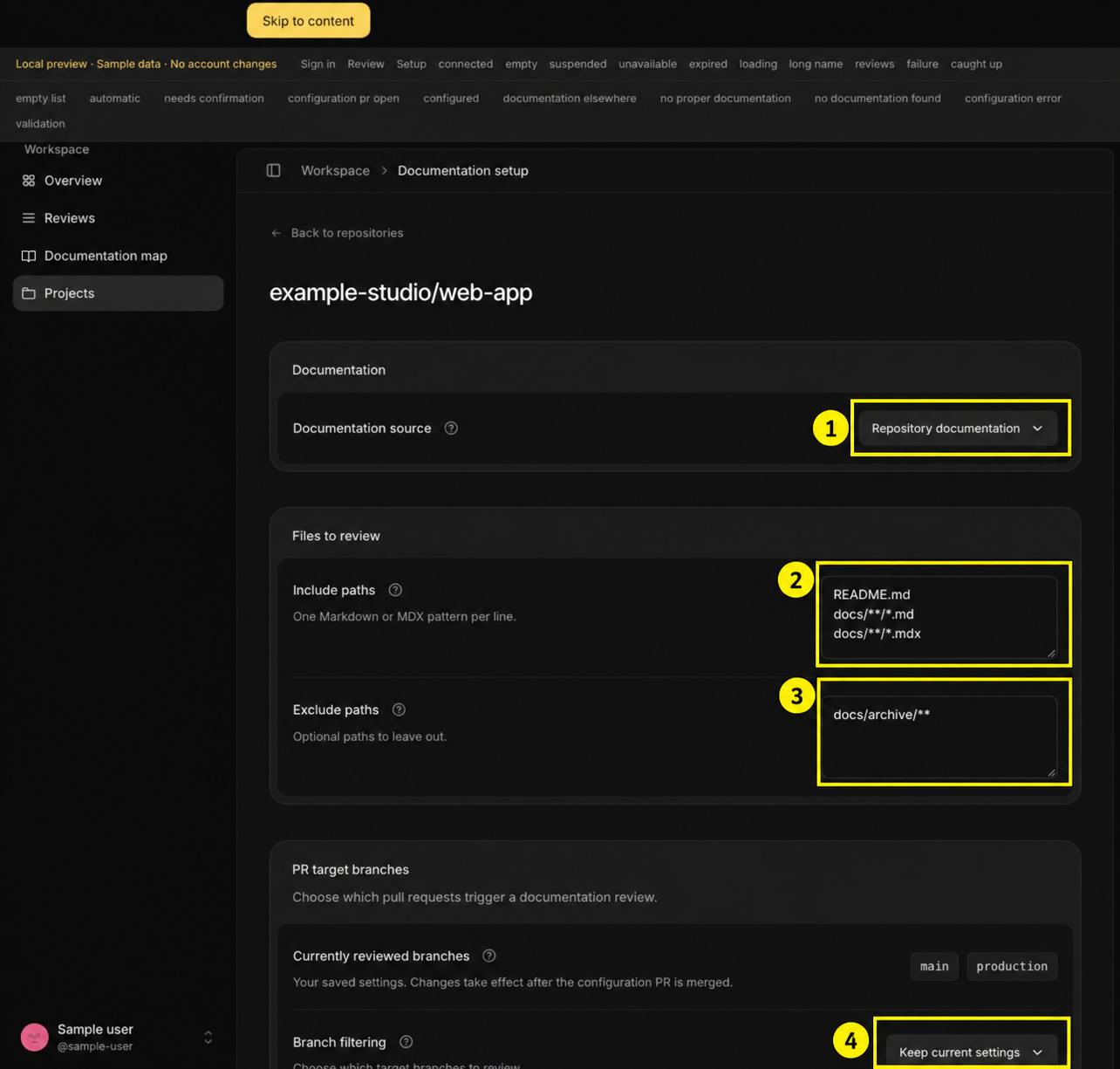
Annotated local preview with sample data, captured September 29, 2026. The numbered outlines match the controls below.
Choose Repository documentation (1), then set Include paths (2) to the files Hemm should review. For example:
README.md
docs/**/*.md
Use Exclude paths (3) for material you want to leave out, such as:
docs/archive/**Use Branch filtering (4) to choose the target branches whose pull requests Hemm should review, then scroll down and select Create configuration PR.
Review and merge that PR to activate the settings. Until it is merged, your active settings remain unchanged.
What happens next?
Your Documentation map describes the documents Hemm has analyzed. Documentation reviews examine eligible pull requests for changes that may affect those documents.
Creating a map and activating PR reviews are separate steps.
If you select Documentation elsewhere, Hemm records the location only. It does not review that external source in this pilot.