
Understand and refresh your Documentation map
Your Documentation map shows the documents Hemm found and its understanding of their purpose and audience.
Use it to check that Hemm is working with the right documentation and to correct anything it misunderstood.
1. Inspect a document
Open Documentation map (1) in the sidebar. Expand a document group, such as Getting started (2), and select a document.
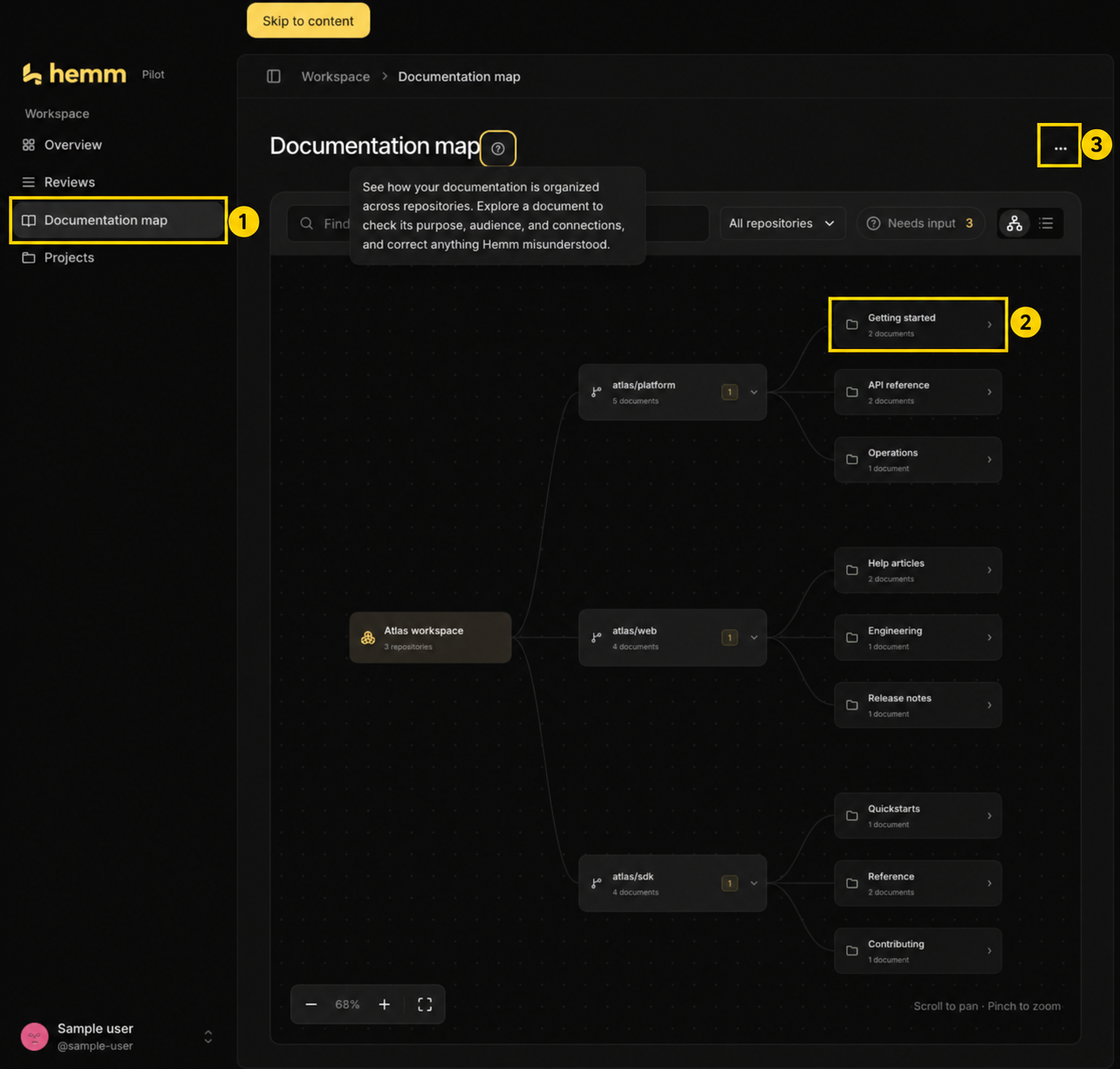
Annotated local preview with sample data, captured September 29, 2026. Use (1) to open the map, (2) to explore a group, and (3) to access remapping.
Review its summary, audience, and supporting source excerpt. Follow the source link when you need to compare Hemm’s interpretation with the original file.
A summary is an interpretation of the document—not a guarantee that its instructions are accurate or complete.
2. Confirm how the document is used
Confirm or correct the document’s use through the available controls.
These decisions help describe your documentation. They do not edit the Markdown file or move it to another folder.
To change the article itself, edit the file in GitHub through your normal review process.
3. Refresh after changing your docs
Once your documentation changes are merged into the repository’s default branch:
- Open Documentation map.
- Open the ⋯ Documentation actions menu (3) highlighted above and choose Remap documentation.
- Select Start remap.
Hemm checks for added, moved, and removed Markdown or MDX files. It analyzes new or changed documents and keeps your decisions for unchanged documents.
You can continue using the current map while the refresh runs.
A document is missing
Check these possible causes:
- The file hasn’t reached the repository’s default branch.
- Its path is outside the configured documentation scope or is excluded.
- The file was skipped or could not be read.
- Hemm no longer has access to the repository.
A missing entry means the document wasn’t available in the examined scope. It does not prove that the documentation exists nowhere else.
Analysis didn’t finish
During onboarding, choose Retry analysis. If only some repositories failed, you can finish with the available results.
When an existing map offers Remap documentation in the ⋯ Documentation actions menu, use it to request another analysis. Reloading the page alone does not start a new run.
If the problem continues, share the repository name, visible error, and approximate time of the failure with Hemm support.
What the map can tell you
The map helps you understand and organize existing documentation. It does not yet provide a complete audit of missing help articles or check every instruction against your product.